Top 15 Free Learning Websites for Kids
Free learning websites for kids ranked by My Coloring Pages. Discover 15 top picks that make learning fun and totally free.


Finding quality educational resources no longer requires expensive tutoring programs or endless searching across unreliable sites. Free learning websites for kids have made it genuinely practical for parents and teachers to access interactive lessons, skill-building activities, and printable materials that match where a child actually is in their learning. The challenge is knowing which platforms deliver real value, not just surface-level content.
For families who want a single, reliable starting point, My Coloring Pages offers over 75,000 worksheets and coloring pages built to support children across different subjects and skill levels. The platform keeps things simple, whether a child needs math practice, reading reinforcement, or a creative activity to close out the school day. To get started right away, Download 75000+ Free Customized Worksheets.
Table of Contents
- Is Online Learning Useful for Kids?
- Importance of Online Learning for Kids
- 11 Reasons Online Learning is Preferred for Modern Education
- How to Engage Kids in Online Learning in 17 Ways
- Top 15 Free Learning Websites for Kids
- Which Free Learning Website Should You Choose?
- Don’t Just Find a Free Website—Make Sure the Learning Continues After the Screen
Summary
- Online learning produces measurably stronger retention than traditional classroom instruction, but not because of the technology itself. Research shows that well-designed digital learning can increase retention rates by 25 to 60 percent compared to conventional teaching methods. The advantage comes from faster feedback loops, compressed repetition, and the ability for children to return to the exact moment of confusion rather than waiting days for a correction.
- The pace of instruction in traditional classrooms creates a compounding problem that most parents never see clearly. When a child misses a foundational concept, the lesson moves on anyway, and confusion builds quietly over time. Online learning lets children pause, revisit, and control the pace of their own understanding without disrupting others or signaling to peers that they need more time.
- Motivation in online learning drops significantly when content doesn't connect to a child's actual interests. Research published in Frontiers in Education found that approximately 60 percent of students reported lower motivation in online versus in-person learning environments. That gap is not a content volume problem. It is a relevance problem, and adding more lessons without addressing personal connection does not fix it.
- Passive engagement is one of the most common failure points in digital education for children. A structured online program tracked in a PMC study achieved a 95 percent attendance rate across sessions, demonstrating that children return consistently when the design requires genuine cognitive effort rather than passive clicking. The difference between appearing engaged and actually thinking is where most online learning quietly falls apart.
- Access to quality educational resources has historically been uneven across geography and income, and online platforms are quietly narrowing that gap. The global online learning market is projected to reach 279.30 billion dollars by 2029, reflecting real demand from families seeking resources beyond what their local schools or budgets can provide. A child with a curious mind and a reliable internet connection now has access to tools that previously required specialty schools or private tutors.
- The habit of self-directed learning does not develop automatically. Students who always receive assigned tasks and external deadlines rarely build the instinct to initiate learning on their own. Asynchronous online formats require children to make small decisions constantly, including what to review, when to move forward, and where to go when something does not make sense, and that repeated practice builds metacognitive habits that carry across every future learning environment.
- My Coloring Pages's Download 75000+ Free Customized Worksheets addresses the relevance gap directly by letting parents and teachers generate printable pages matched to a specific topic, skill level, or child interest rather than settling for whatever a broad search happens to return.
Is Online Learning Useful for Kids?
Online learning works for kids when it requires active participation. Research shows passive watching produces passive results, while active participation, feedback loops, and difficulty levels that match what students can do produce real skill development. The screen itself is neutral—how it's designed matters most.
"Active participation, feedback loops, and difficulty levels matched to the student produce real skill development — the screen itself is neutral."
Learning Approach | Outcome |
|---|---|
Passive watching | Passive results |
Active participation | Real skill development |
Matched difficulty levels | Measurable growth |
🔑 Takeaway: The quality of design — not the device — determines whether online learning delivers genuine results for kids.
💡 Tip: When evaluating an online learning tool for your child, look for built-in feedback loops and adaptive difficulty — these are the critical features that separate effective platforms from passive screen time.
⚠️ Warning: Not all online learning is created equal. Passive video consumption without interaction or feedback is unlikely to produce meaningful skill gains.
Can online learning actually improve how much kids retain?
According to Devlin Peck's Online Learning Statistics, online learning can increase student retention by 25 to 60 percent compared to traditional classroom instruction. Well-designed digital learning achieves this through increased practice, personalized pacing, and faster feedback than a teacher managing 28 students can provide. A child who receives immediate correction after a wrong answer learns more than one who waits until Thursday's test to discover the mistake.
What does your child actually have to do on a learning site?
The failure point is usually the same: a child watches, clicks next, and moves on without retrieving, applying, or explaining anything. Some interactive learning platforms build in problem-solving checkpoints, adaptive quizzes, and skill-based progression. Others are slideshows with a progress bar. When evaluating any children's learning site, the only question that matters is what your child must do, not what they watch.
Why do generic worksheets fall short of where a child actually is?
Most parents balance screen time by seeking worksheets or printable activities. That instinct is sound, but generic worksheets rarely match where a child actually is in their learning. Platforms like Download 75000+ Free Customized Worksheets let parents and teachers create pages matched to a specific theme, skill level, or moment. Customized coloring pages provide targeted reinforcement aligned with what a child is studying that week, delivering more learning value than random printables.
Does online learning replace classroom time?
Online tools work best when they supplement classroom learning rather than replace it. They give children space to practice skills, revisit concepts at their own pace, and build fluency through repetition. Research from the University of Illinois Springfield's ION resource on online learning shows that asynchronous online learning gives students 100 percent more time to reflect and share responses than traditional face-to-face discussion, which is especially valuable for children who need processing time. For children in homeschool or after-school settings, this flexibility offers a structural advantage. This structural advantage matters in ways most people haven't considered.
Related Reading
Importance of Online Learning for Kids
That structural advantage unlocks genuine benefits in a child's learning experience: shaping cognitive development, building essential skills, and fostering long-term academic success in ways that traditional learning environments cannot match.
"Online learning gives children the flexibility, personalization, and engagement they need to thrive, turning screen time into meaningful growth."
🎯 Key Point: Online learning is a powerful developmental tool that equips kids with critical skills for the digital age.
💡 Tip: Look for structured online programs combining interactive content, real-time feedback, and self-paced progression to maximize your child's learning outcomes.
Benefit | Why It Matters |
|---|---|
Flexible Scheduling | Learns at their own pace, reducing stress |
Personalized Content | Targets individual strengths and gaps |
Engaging Formats | Boosts attention and retention |
Accessible Resources | Learning happens anytime, anywhere |
✅ Best Practice: Choose platforms that offer progress tracking and adaptive learning paths — these features are essential for keeping kids motivated and on track.
What retention actually looks like in practice
The problem usually isn't that kids aren't trying hard enough. Most kids who struggle in school are putting in effort. The real issue is the gap between hearing something once and remembering it. According to Devlin Peck's analysis of online learning statistics, online learning can increase student retention by 25 to 60 percent compared to regular classroom teaching. Online formats let kids return to the exact moment they got confused: the specific explanation, picture, or example that didn't make sense the first time. A child who retains 40 percent more of what they learn each week builds a stronger foundation for every subsequent idea. Across a whole school year, this difference transforms how a child sees themselves as a learner.
When generic resources create invisible friction
Most parents searching for free learning websites for kids find the same few platforms: educational games, printable activity sheets, reading comprehension tools, and math drills. The problem emerges when content doesn't match the child. A worksheet about ocean animals means nothing to a child who loves dinosaurs, and a reluctant learner disconnected from the material will disengage before the skill takes hold.
Parents often respond by searching longer and downloading more, yet still receive generic results. Platforms like My Coloring Pages work differently: instead of browsing a fixed library, a parent or teacher creates a page built around what the child actually likes—a specific animal, learning theme, or something from their week—turning a coloring activity into a personalized way to start vocabulary, storytelling, or early literacy work.
The access problem nobody talks about loudly enough
The online education market is growing because access to quality learning resources has historically been uneven, and digital tools are closing that gap. Wooclap's research on online learning statistics projects the global online learning market will reach $279.30 billion by 2029, reflecting strong demand from families seeking resources beyond what their local schools can provide. A child in a rural area with internet access now has access to interactive science simulations, adaptive reading programs, phonics tools, and creative learning platforms that would have required a specialty school or private tutor a generation ago.
Why curiosity is the real curriculum
Kids who do well over time learn that asking questions gets them somewhere. Free learning resources work best when they treat curiosity as a starting point, not a distraction. A child who asks why volcanoes erupt deserves a real answer immediately, not a promise that it will come up in class. Online learning spaces that offer video explanations, interactive diagrams, or creative follow-up activities teach something more important than facts: that children can initiate learning themselves, not merely receive it.
9 Reasons Online Learning is Preferred for Modern Education
Online learning works—the real question is why it fits modern children so naturally. The answer has less to do with screens and more to do with how children actually process, keep, and own their learning.
"The shift to online education isn't about technology—it's about how children learn best: at their own pace, in their own space, with tools that adapt to them." — Education Research Insight
🎯 Key Point: Online learning succeeds because it aligns with children's natural learning processes—not just because it uses digital tools.
💡 Tip: When evaluating online education platforms, focus on features that support active learning, self-pacing, and personalized feedback—these are the true drivers of student success.
Traditional Learning | Online Learning |
|---|---|
Fixed pace for all students | Self-paced progression |
Passive content delivery | Active, interactive engagement |
One-size-fits-all approach | Personalized learning paths |
Limited review opportunities | On-demand content replay |
Rigid scheduling | Flexible access anytime |
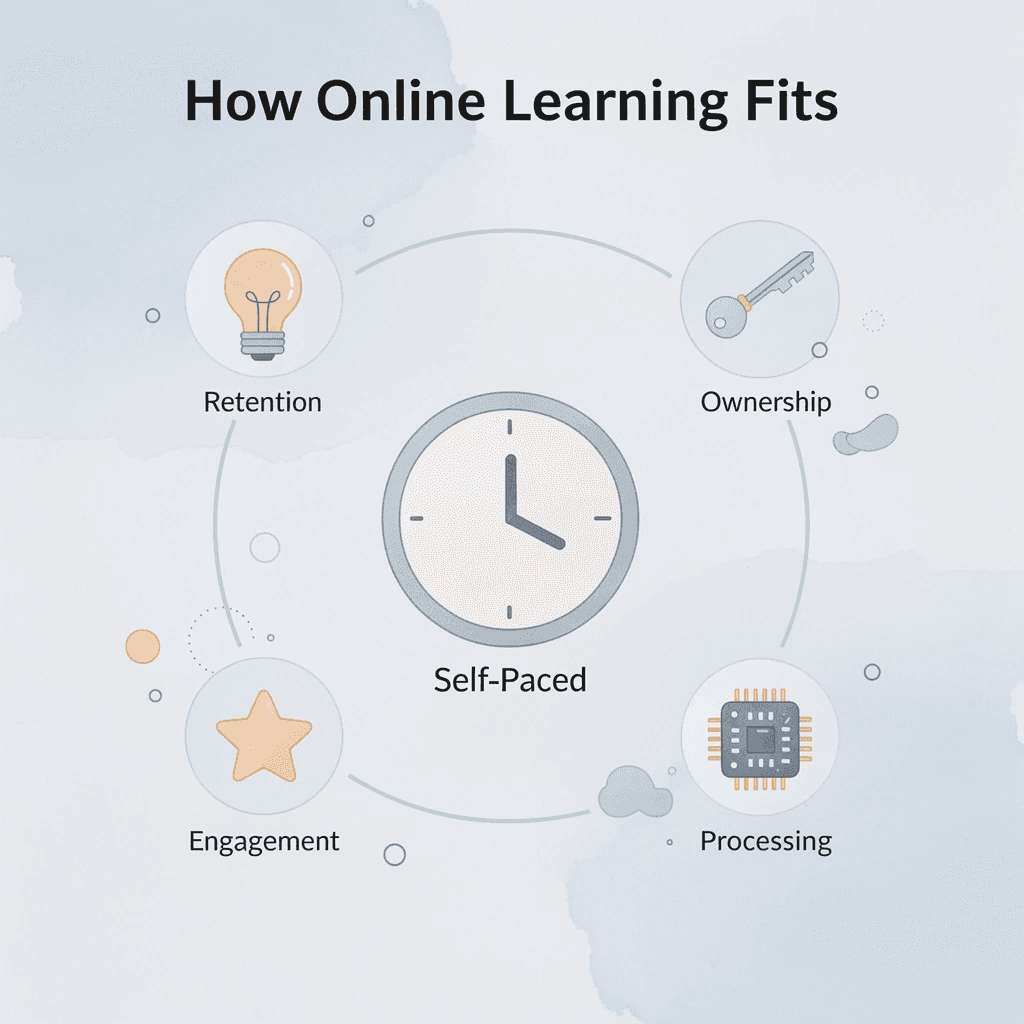
✅ Best Practice: Recognize that online learning's real power lies in its ability to match how individual children process and retain information—making it far more than just a convenient alternative to traditional classrooms.
1. The pace problem nobody talks about
The problem with traditional classroom learning is not the student; it is the fixed pace. Every student gets the same explanation at the same speed, whether they understand it on the first attempt or the fifth. When a child misses a foundational concept, the lesson continues. Confusion accumulates silently until the child stops believing they belong in the subject.
How does online learning give kids control over their own understanding?
Online learning breaks that pattern. Students can pause, rewind, and revisit specific moments in an explanation without disrupting others or revealing they need more time. That structural change creates something important: a child who controls their learning pace rather than racing against a clock.
2. Geography used to be destiny
Students in rural areas or cities without specialized programs were limited to what local schools offered. Curiosity about coding, animation, advanced mathematics, or a second language hit a geographic barrier in a world where information moves freely. According to Frontiers in Education, over 70% of learners cite flexibility as a main benefit of online education. When a child can access a specialized course, interactive simulation, or language-learning platform from home, the question shifts from "Is this taught near me?" to "Can I find a good resource for it?"
3. One explanation is never enough
The same idea taught through a paragraph, an animation, and an interactive model creates three different levels of understanding for three different learners. Some children understand geometry through visual diagrams; others need to move and change the shape themselves, and a few need to hear the logic explained aloud. Traditional classrooms typically offer one format per lesson and then move on.
What happens when a child can choose their own format?
Online learning environments built around free educational tools for kids offer multiple ways to learn the same idea. A child who struggles with written explanations can try a video. A child who loses focus during a video can try a quiz or simulation. The format becomes flexible rather than fixed, which changes what "I don't understand this" means in practice.
4. When creative work meets curriculum
Most parents seeking free learning websites for kids want resources that sustain engagement and foster genuine learning. Generic educational content often misses what children care about: a worksheet on community helpers resonates differently with a child obsessed with space exploration than one connecting to their existing interests.
Our Download 75000+ Free Customized Worksheets at My Coloring Pages lets parents and teachers create coloring pages tied to specific themes, subjects, or moments. A lesson on habitats pairs with a rainforest scene for coloring; a unit on letters features the animal a child is currently interested in. Content meets the child where their attention already is.
5. Mistakes corrected in minutes, not days
A student who completes twenty practice problems using the wrong method practices the wrong process twenty times. Repetition makes it harder to unlearn. Traditional homework cycles delay error discovery until the next day, after the pattern has reinforced itself. Online platforms with instant feedback close that gap. A wrong answer triggers immediate correction before the next attempt, allowing the child to adjust strategy in real time rather than doubling down on a flawed approach. This transforms what practice produces.
6. The self-direction gap
Students told what comes next rarely develop the instinct to figure it out themselves. When every task is assigned, every deadline set externally, and every resource handed over, students never practice the skill of self-directed learning. This is a structural outcome, not a character flaw.
Online learning, particularly asynchronous formats, requires students to make small decisions constantly: what to review, when to move forward, where to go when something doesn't make sense. According to University of Illinois Springfield's ION Resources, asynchronous online learning allows students to reflect and articulate responses with greater depth than traditional face-to-face discussion. This depth stems from giving learners space to think before responding, rather than rewarding whoever speaks fastest.
7. Digital literacy is not optional anymore
Knowing how to watch content on a screen differs from using technology to accomplish tasks. A child who can scroll through videos but cannot organize a digital file, evaluate a source, or collaborate on a shared document is not digitally literate—they are digitally entertained. This gap matters as children move toward environments where technology functions as a working tool, not merely a delivery mechanism for information.
How does online learning build functional digital skills alongside subject knowledge?
When used well, online learning helps students build useful digital skills alongside subject knowledge. Children learn to navigate educational platforms, locate resources, track their progress, and collaborate using digital tools. These foundational skills develop naturally through platforms designed for active engagement rather than passive video consumption.
8. The continuity problem with fixed schedules
Traditional education connects learning to a specific place and time. When the bell rings, the lesson stops. A curious child must either wait until the next day to pursue a question or let it fade. The habit of abandoning questions is one of the quieter costs of time-bound instruction.
How does on-demand access change a child's relationship with learning?
Online access changes this dynamic. A child who wonders how volcanoes form at 7 pm on a Tuesday can find an interactive explanation, video, or activity immediately. That quick response teaches something the content itself cannot: you can initiate learning, not just receive it when someone else decides it is time.
9. What actually keeps children coming back
Engagement in online learning stems from making material relevant to the child. A child who sees their interests reflected in the curriculum shows up differently than one working through unrelated content. Relevance is a structural advantage, not a motivational trick. The best free educational websites for kids understand this: they give children a reason to return—a sense that the next page or lesson connects to something that already matters to them. That connection turns a single session into a habit.
How to Engage Kids in Online Learning in 17 Ways
Keeping a child engaged online isn't about the screen; it's about whether the learning asks anything of them. Passive consumption dressed up with colorful animations remains passive consumption. The real question every parent and educator must ask: does this lesson require the child to think, respond, and produce, or simply to watch and click? That distinction underpins every effective strategy in this guide.
The failure point is usually invisible. A child sits through a 20-minute lesson, clicks the right answers, earns a badge, and remembers almost nothing by dinner. That gap between appearing engaged and actually thinking is where most online education quietly falls apart. True engagement means cognitive effort — the kind that feels slightly uncomfortable, requires decision-making, and leaves a child with something they can explain back to you.
"The difference between a child who looks engaged and one who is engaged is the presence of active cognitive effort — and that gap is where online learning most commonly fails."
💡 Tip: Before choosing any online learning tool or program, ask one question: Does this require my child to produce something — an answer, a decision, a creation — or just consume it? Production drives retention. Consumption rarely does.
🎯 Key Point: The 17 strategies below are all built around one principle — engagement is not attention. A child can pay attention to a video and learn nothing. Real engagement means learning asks something of them every step of the way.
Surface Engagement | Real Engagement |
|---|---|
Watching a lesson video | Answering questions mid-lesson |
Clicking multiple-choice answers | Explaining reasoning out loud |
Earning a badge or reward | Applying a concept to a new problem |
Finishing a module | Teaching it back to a parent or sibling |
Scrolling through content | Creating a summary or mind map |
⚠️ Warning: Gamification alone is not engagement. Badges, points, and leaderboards can motivate a child to show up — but if the underlying task requires no real thinking, the learning outcome will be negligible. Always look beyond the reward system to the cognitive demand underneath it.
1. What separates active learning from passive clicking?
The critical difference is cognitive demand. When a child predicts an outcome before a video reveals it or explains a concept aloud after a lesson, their brain processes information differently than when they passively watch. The screen delivers content; the child must do something with it.
What does the research say about engagement and return visits?
According to a PMC study on virtual summer programs, students attended an average of 14.3 out of 15 possible sessions, a 95% attendance rate. This occurs when program design gives children reason to return: each session demands engagement and rewards effort with visible progress.
How can a small shift in approach change how children engage with material?
After watching a science video, ask the child what they think will happen before the result appears. After a maths explanation, pause and have them try the next problem independently. This shift from watching to predicting changes how the child engages with the material.
2. Why One Explanation Is Never Enough
A child struggling with a concept may be struggling with that particular explanation. Online education's advantage over a single classroom teacher is access to multiple representations: animations, diagrams, worked examples, simpler versions, and different voices. When one explanation fails, replaying it five times teaches the child that confusion means they lack capability. The stronger response is a different format entirely: a visual diagram where words failed, a physical demonstration where a video fell short. The concept doesn't change. The bridge to it does.
3. The Motivation Problem Nobody Solves With More Content
Research published in Frontiers in Education found that about 60% of students reported lower motivation when learning online than in person. This reveals a structural problem, not a content one. Adding more lessons won't fix low motivation; connecting learning to what the child already cares about will.
Why does matching a child's interests unlock engagement?
A child obsessed with animals will push through a difficult reading comprehension exercise if the passage concerns wildlife. A child who loves building will tolerate fractions when the context involves construction or design. Subject matter is the hook; curriculum follows once the child is engaged.
How does on-demand personalization remove friction between motivation and learning?
Most free educational resources offer fixed content libraries. Tools that allow on-demand personalization, where content matches the child's specific interest, remove friction between motivation and learning. My Coloring Pages works this way: a child fascinated by dinosaurs receives a dinosaur-themed coloring page reinforcing a lesson, rather than a generic animal print.
4. What happens when wrong answers are treated as a real teaching moment?
Wrong answers are the most underused teaching tool in online learning. Most platforms mark an answer incorrect and offer a "try again" button, prompting children to click randomly until they land on the right option. Nothing is learned except which answer the system accepts.
How does slowing down the feedback moment actually change what a child learns?
The stronger cycle looks like this: attempt, feedback, identify the mistake, understand why the strategy was wrong, change the approach, retry. This requires an adult or well-designed platform to slow the moment down. Ask the child why they think the answer was marked wrong before they touch the screen again. Read the explanation together. Have them say the correction aloud. Now the feedback has done its job.
5. Building Independence, Not Dependency
The goal of every online learning session should be a child who needs slightly less help next time. This requires adults to gradually transfer responsibility, not simply supervise completion.
How do you gradually hand learning control to your child?
Start by having the child choose the lesson and set the timer. Then let the child choose between two tasks, check what needs completing, and plan the order. Over weeks, the child moves from "learning happens to me" toward "I manage how I learn." This shift builds metacognitive habits that make every future learning environment more productive.
How can you tell when a learning session has gone on too long?
Short learning blocks work better than long sessions. A child who is mentally checked out after 20 minutes of a 45-minute session isn't learning. Watch for random clicking, repeated guessing, or irritability: signs that continuing costs more than it helps.
6. Turn Wrong Answers Into Learning Opportunities
Wrong answers are the most underused teaching tool in online learning. Most platforms mark an answer incorrect and offer a "try again" button. Most children click it randomly until they land on the right option. They learn nothing except which answer the system accepts. Ask the child why they think the answer was marked wrong before they touch the screen again. Read the explanation together. Have them say the correction aloud. Now the feedback has done its job.
7. Use the Attempt, Feedback, Retry Cycle
The stronger cycle looks like this: attempt, feedback, identify the mistake, understand why the strategy was wrong, change the approach, retry. That sequence requires an adult or a well-designed platform to slow the moment down. Instead of simply asking a child to try again, help them understand what changed and why the new approach might work.
8. Gradually Transfer Responsibility
The goal of every online learning session should be a child who needs slightly less help next time. That does not happen automatically. It requires adults to gradually transfer responsibility, not just supervise completion. Start by choosing the lesson, setting the timer, and checking progress. Then let the child choose between two tasks. Then let them check what needs to be completed. Then let them plan the order. Over weeks, the child moves from "learning happens to me" toward "I manage how I learn." That shift matters far beyond any individual subject.
9. Keep Online Learning Sessions Short
Short learning blocks support independent learning better than long sessions. A child who has been staring at a screen for 45 minutes but mentally checked out 20 minutes ago is not learning. Watch for random clicking, repeated guessing, or irritability. Those signals suggest that continuing longer costs more than it produces.
10. Watch for Signs of Disengagement
Engagement is not the same as simply remaining in front of the screen. Random clicking, repeated guessing, irritability, and rushing through activities can indicate that the child is no longer actively processing the lesson. When those signs appear, pause the activity rather than automatically adding more time. The goal isn't to keep the child online as long as possible. It is to make the time they spend learning meaningful.
11. Ask Kids to Teach the Lesson Back
After any lesson, ask the child to explain what they just learned in two minutes. Not to repeat it verbatim. To explain it. They can draw it, demonstrate it, or give an example. If they cannot produce even a basic explanation, the session produced recognition without understanding, and that kind of knowledge disappears fast. This is the simplest, cheapest diagnostic tool available to any parent or teacher using free learning websites for kids. No app required. No assessment platform. Just a question and genuine listening.
12. Let Kids Explain Their Thinking
Don't only ask whether the answer is correct. Ask how the child arrived at it. Questions such as "Why did you choose that answer?" or "How did you figure that out?" reveal whether the child understands the process or simply recognized the correct option. The explanation matters because it makes the child's thinking visible.
13. Connect Online Lessons to Offline Activities
The screen should not be the entire learning environment. After a lesson, give the child an opportunity to use what they learned away from the device. A science concept can become a simple experiment. A reading lesson can become storytelling. A maths lesson can become a real-life measurement or counting activity. Learning becomes more meaningful when the child sees the concept beyond the screen.
14. Give Children Choices Within the Lesson
Children are more likely to take ownership when they have some control over what they do. Instead of deciding everything for them, offer two appropriate choices. Let them choose which activity to complete first or which format they prefer when learning a difficult concept. Over time, this supports the shift from "learning happens to me" toward "I manage how I learn."
15. Give Learning a Real Purpose
The curriculum is easier to engage with when children understand what the skill allows them to do. A child can experience fractions through cooking, measurement through objects around the house, reading through a mystery, or science through a prediction experiment. The subject matter is the hook. The curriculum is what follows once the child is already leaning in.
16. Make the Child an Active Participant
Online learning becomes passive when the child only watches, clicks, and moves forward. Give them something to predict, explain, create, solve, compare, or demonstrate. The goal is not simply to complete a lesson. It is to make the child interact with the information.
17. End Every Session With a Teach-Back
End the session by asking the child what they learned and how they would explain it to someone else. What the child can teach back is what they actually learned. This also gives parents and teachers a quick way to identify gaps without turning every online learning session into another formal test.
Why Engagement Matters More Than Screen Time
The goal of online learning is not to keep children in front of a screen for longer. It is to make the time they spend learning more active and meaningful. A child who predicts, explains, questions, applies, experiments, and corrects their own mistakes is doing something fundamentally different from a child who simply watches a lesson and clicks through multiple-choice answers.
The strongest online learning cycle looks like this:
Curiosity → choice → action → challenge → feedback → adjustment → discovery → willingness to continue
That is what turns online learning from something a child completes into something a child actually participates in.
Final Thoughts
Engaging kids in online learning takes more than better videos or more educational content. Children need reasons to think. They need opportunities to make predictions, make mistakes, explain ideas, connect lessons to their interests, and use what they learned outside the screen. When online learning gives children something meaningful to do with the information they receive, engagement becomes more than clicking the next button. It becomes active learning.
Related Reading
- Best Online Learning Platforms For Kids
- Free Learning Websites For Kids
- How To Make Learning Fun For Kids
Top 15 Free Learning Websites for Kids
1. My Coloring Pages
Best for
Turning online learning into offline creativity and helping kids apply what they have just learned.
One weakness of online learning is how easily it becomes:
Watch → click → next lesson → forget.
My Coloring Pages can help interrupt that cycle.
After your child learns about something online, ask:
“What could you create from what you just learned?”
For example
- Space lesson: Create an astronaut exploring a new planet.
- Animal habitats: Create an animal in the environment it needs to survive.
- Dinosaurs: Make a prehistoric scene.
- History: Recreate a setting from the period.
- Story: Turn an important scene into a printable.
My Coloring Pages has a library of 75,000+ free coloring pages, making it a useful resource for this list. You can also use its personalized creation tools when available for your plan.
The important part is the sequence:
Learn online → child recalls information → chooses what to create → coloring page provides the visual starting point → print → child colors, labels, adds details, and explains the page. That directly tackles several problems established earlier.
How it helps
Too much passive screen time?
Move the activity from screen to paper.
Child constantly asks what to make?
Have them choose the concept.
Blank-page frustration stops them?
Give them a visual starting scaffold rather than doing the thinking for them.
Want to know whether they understood the lesson?
Ask:
- “Why did you put that there?”
- “What does this part show?”
- “What did you learn that helped you make this?”
The solution bridge is
Passive online lesson → retrieve knowledge → create something from it → explain choices → apply learning offline.
That is why My Coloring Pages belongs here—not as a replacement for structured academic instruction, but as a way to help learning continue after the screen switches off.
2. Khan Academy
Best for
Self-paced maths, science, computing, economics, and other school subjects. Khan Academy offers 840+ free courses covering core K–12 and early-college subjects.
It directly tackles one of traditional learning's biggest pain points:
“The lesson moves on even though my child still doesn't understand.”
Instead of:
Miss concept → class moves forward → gap grows
Children can:
Watch explanation → pause → practice → identify mistake → revisit → continue. This makes Khan Academy especially useful for catching up, reviewing difficult concepts, or moving ahead independently.
3. PBS KIDS
Best for
Younger children who need playful learning rather than long formal lessons. PBS KIDS offers hundreds of free educational games, with activities supporting areas such as science, maths, creativity, social-emotional learning, and problem-solving. Its Games app is aimed largely at children ages 2–8.
This tackles:
Learning feels too formal → child disengages.
The stronger use is:
Familiar character → game creates challenge → child solves, chooses, or experiments → parent extends it afterward.
For example, after a science game, ask:
“Can you show me what happened?” That prevents the educational game from becoming just another piece of screen entertainment.
4. Code.org
Best for
Coding, computer science, AI literacy, and turning kids from technology consumers into creators. Code.org provides free K–12 computer science and AI curricula, including self-paced activities and tools for building animations, games, apps, music, and other projects. Its curriculum and technology are free and openly available.
It tackles a major modern-education problem:
A child knows how to use technology → but mainly uses it to consume.
Code.org changes that into:
Learn concept → write instructions/code → test → debug → create something. The child is no longer simply playing somebody else's game. They can start learning how games and digital systems are made.
5. Scratch
Best for
Creative coding, storytelling, animation, and game creation. Scratch, developed by the MIT Media Lab's Lifelong Kindergarten group, lets children create their own interactive stories, games, and animations. It is free and primarily designed for ages 8–16. This directly tackles passive screen use.
Instead of:
Open game → play game → close game
The child can:
Have an idea → program it → something breaks → debug → change it → share finished creation.
That gives them repeated practice in:
- Creative thinking
- Logic
- Persistence
- Problem-solving
6. National Geographic Kids
Best for
Animals, geography, nature, science, and curiosity-driven learning. National Geographic Kids provides free kid-oriented articles, animal information, videos, quizzes, puzzles, games, science content, and exploration topics.
This is useful when the problem is:
“My child only learns when somebody assigns something.”
Start with their curiosity.
If they suddenly become fascinated by sharks:
Explore sharks → read/watch → take quiz → ask another question → draw habitat, build model, or explain a fact.
That turns:
Adult assigns learning
into:
Curiosity starts learning.
7. NASA Space Place
Best for
Space, Earth science, astronomy, science activities, and children who want to learn by doing. NASA Space Place includes free content on the Sun, Earth, the solar system, space, and technology, along with games, crafts, videos, printable activities, stories, and hands-on projects. Its biggest advantage is that learning does not have to stay online.
The process can become:
Read about space → play related game → download activity → build, write, or experiment offline.
That directly solves:
Online learning = endless screen time. The website can provide the information while the child does part of the actual learning away from the screen.
8. Funbrain
Best for
Children who want mixed reading, maths, books, and educational games without choosing a full curriculum. Funbrain offers hundreds of free games, books, videos, and printables for children from Pre-K through Grade 8, covering areas such as maths, reading, literacy, and problem-solving. You can also browse content by grade.
This tackles:
Traditional practice feels repetitive → the child avoids practicing.
Instead, you can use a targeted game around:
- Fractions
- Vowel sounds
- Addition
- Shapes
- Another specific skill your child needs
The key is to choose based on the skill your child needs, not to let them jump randomly from one game to another.
9. CoolMath4Kids
Best for
Making elementary maths practice feel less like another worksheet. CoolMath4Kids provides maths games, lessons, quizzes, virtual manipulatives, and brain teasers covering topics including addition, subtraction, multiplication, division, fractions, and other elementary maths concepts. Games span kindergarten through sixth grade.
This directly tackles:
“My child hates maths practice.”
Instead of:
20 questions → boredom → rushing
you can use:
Concept explanation → interactive representation → maths game → quick check afterward.
The maths remains.
The format gives the child another reason to stay with it.
10. Smithsonian Learning Lab
Best for
History, science, art, culture, primary sources, and older children who enjoy investigating real objects. The Smithsonian Learning Lab is a free interactive platform containing millions of digital museum resources, including images, recordings, texts, videos, artifacts, and expert-created learning collections. Users can also organize resources into their own collections.
This directly tackles passive learning.
Instead of simply:
Read history fact → memorize it
a child can:
Explore real artifact → investigate context → compare sources → collect relevant objects → explain why they belong together.
That moves them from:
Information receiver
to:
Information investigator.
11. Prodigy Math
Best for
Children who need repeated maths practice but lose interest in ordinary drills. Prodigy's standards-aligned educational maths content is free, while optional paid memberships add additional features. The free maths game embeds questions into quests and battles and adjusts content to the child's level.
This addresses the repetition problem:
Need more maths practice → ordinary drills become boring → child avoids practice.
Prodigy instead creates:
Game goal → maths problem → solve to progress → repeat skill inside game.
The key parent check should be:
“Is my child actually thinking through the maths—or rushing through questions to get back to the game?” The game should motivate the practice, not replace it.
12. CK-12
Best for
Older children who need free STEM explanations, interactive textbooks, simulations, and adaptive practice. CK-12 provides free resources including digital FlexBooks, interactive lessons, videos, simulations, inline questions, and adaptive practice, with a strong focus on K–12 STEM subjects.
This tackles:
“The textbook explanation isn't making sense.”
A child can encounter the same concept through:
Text → video → simulation → interactive problem → adaptive practice.
That supports one of online learning's most important advantages:
One explanation fails → try another representation
rather than:
“I didn't understand it, so I must be bad at the subject.”
13. Mathigon
Best for
Interactive maths, visual learners, puzzles, and children who learn better by manipulating concepts. Mathigon is completely free for students, teachers, and parents and includes interactive maths courses, games, puzzles, and its Polypad virtual manipulatives.
This is particularly useful when abstract maths feels meaningless.
Instead of only:
See formula → memorize formula
children can:
Move objects → explore pattern → test idea → see relationship → solve problem. That can make maths feel more like something to investigate than something to copy from a page.
14. Starfall
Best for
Early reading, phonics, struggling readers, and children who need low-pressure literacy practice. Starfall offers a meaningful collection of free reading resources, including alphabet activities, sequential phonics lessons, books, games, and downloadable materials. Additional activities are available through paid membership, so it is better described as offering substantial free content rather than being completely free.
Its approach is especially useful for children who have started associating reading with:
Difficulty → correction → embarrassment → avoidance.
Starfall uses untimed, multisensory, and interactive activities and emphasizes exploration and positive reinforcement.
That changes the experience toward:
Hear sound → see letter → interact → practise → progress gradually
rather than:
Struggle publicly → get corrected → want to stop.
15. Google Arts & Culture
Best for
Art, history, culture, museums, and children who need learning to feel connected to the real world. Google Arts & Culture hosts free educational material from museums and cultural institutions. For example, the National Gallery of Art provides free resources there for learners from preschool through high school, including activities, films, lesson resources, and hands-on extensions.
This tackles:
“Why do I need to learn this?”
Instead of only reading:
Artist name + date + movement
a child can:
View actual artwork → investigate details → learn context → compare pieces → create something inspired by it.
The subject becomes connected to real objects, real places, and real human stories rather than remaining an isolated textbook fact.
Which Free Learning Website Should You Choose?
Do not open five websites and hope one magically works. Match the site to the problem.
Choose based on your child's learning need
- Child needs structured explanations across school subjects: Khan Academy
- Young child needs learning to feel playful: PBS KIDS
- They mostly consume technology: Scratch or Code.org can turn them into creators
- They are fascinated by animals and nature: National Geographic Kids
- Space questions never stop: NASA Space Place
- They need free mixed academic games: Funbrain
- Maths practice is a daily fight: CoolMath4Kids or Prodigy
- Abstract maths isn't clicking: Mathigon
- They need different STEM explanations and simulations: CK-12
- Reading feels frustrating: Use Starfall's free literacy resources
- They learn through real objects and investigation: Smithsonian Learning Lab
- They love art or history: Google Arts & Culture
- You want an online lesson to become an offline creative activity: My Coloring Pages
That follows the solution-bridge approach:
Identify problem → choose website with a feature that addresses it → child uses that feature differently → observe whether understanding, independence, or engagement improves → keep, change, or combine resources based on the result.
Not:
“It's free → let my child use it for an hour → assume learning happened.”
And use the same quality test from the earlier sections:
What does my child actually have to do while using this website?
The strongest free learning websites ask children to:
- Solve
- Retrieve
- Practise
- Create
- Predict
- Investigate
- Receive feedback
- Correct
- Apply
Because free online learning is valuable only when the website gives children more than another reason to stare at a screen. The goal is to find the free resource that gives your child another route into understanding—and, whenever possible, something meaningful to do with that understanding afterward.
Don’t Just Find a Free Website—Make Sure the Learning Continues After the Screen
Pick one free learning website that matches a real gap you see. Let your child complete one focused activity, then use My Coloring Pages to turn what they learned into something physical they can finish, label, and explain offline. This sequence reveals whether the resource created genuine understanding or merely held attention.
"The real measure of a learning tool isn't how long it keeps a child engaged—it's whether they can explain what they learned after the screen turns off."
💡 Tip: After any online learning session, ask your child to explain one thing they learned in their own words. If they can't, the session was passive consumption, not active learning.
⚠️ Warning: A child entertained by a learning website and a child who actually learned from it can appear identical in the moment. The offline follow-up activity reveals the difference.
Our 75,000+ free customizable pages let you match the printable to the exact topic covered—animal habitats, history periods, science concepts—without settling for generic results. If your child can color it thoughtfully and explain their choices out loud, the learning sticks.
Topic Covered Online | Matching Printable Theme | Explanation Prompt |
|---|---|---|
Animal Habitats | Ecosystem scene pages | "Why did you color the water that color?" |
History Periods | Era-specific character pages | "What was happening during this time?" |
Science Concepts | Labeled diagram pages | "What does this part do?" |
🎯 Key Point: The color-and-explain method is a simple but powerful comprehension check—it combines physical engagement, creative recall, and verbal explanation into one offline activity that reveals exactly how much learning actually transferred.
✅ Best Practice: Use My Coloring Pages to customize printables to the specific topic your child just studied online, turning a passive screen session into a complete, testable learning loop.
Related Reading
- Ai Learning App Kids
- ABC Learning For Kids